Architecture
Architecture
This page provides an overview of the MarkBind's architecture.
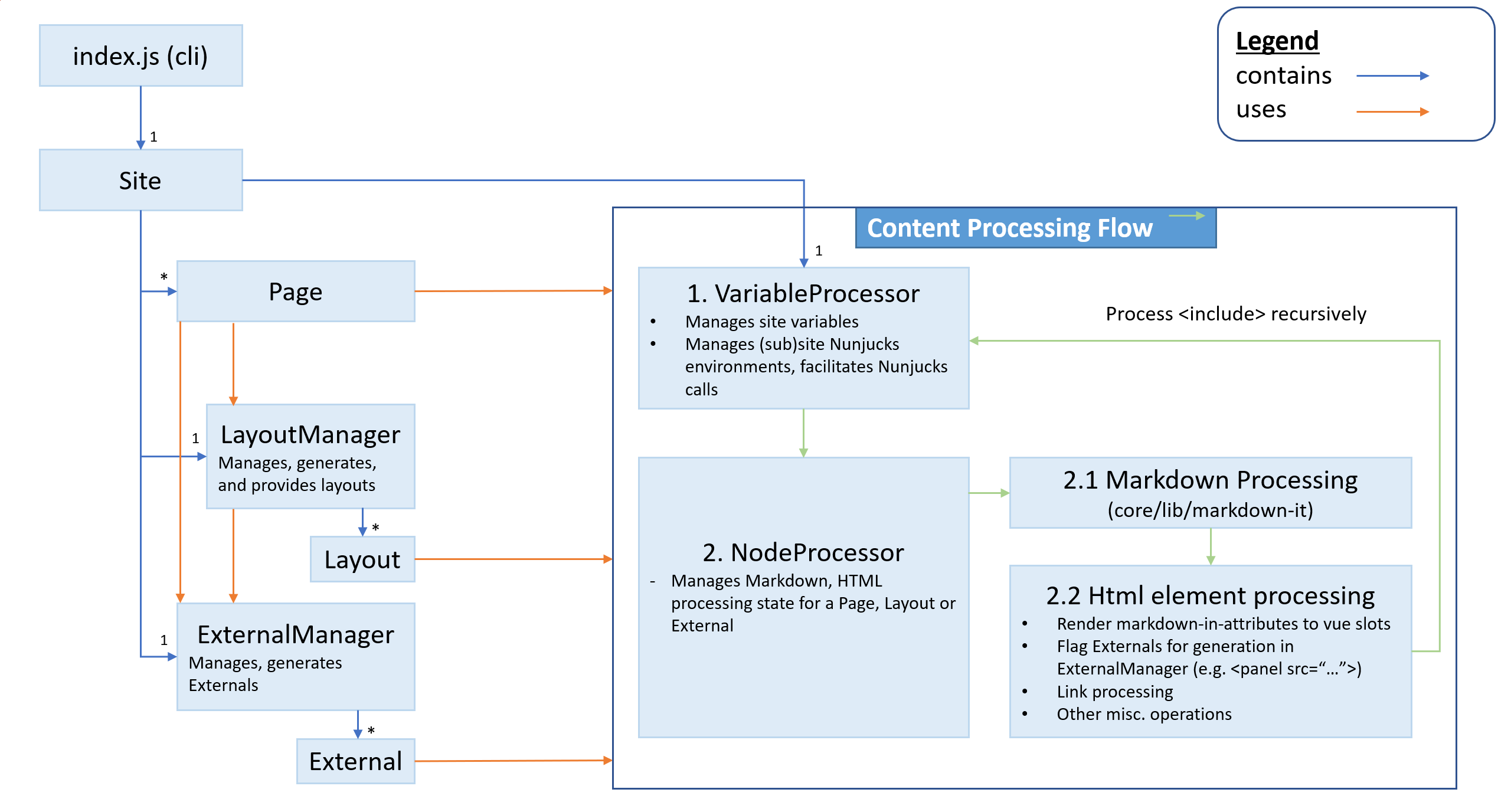
The above diagram shows the key classes and in MarkBind. You may note the following from these:
Key classes
The 3 key classes representing different types of content are as follows:
Page— a page, as specified by the user in their various site configurationgloborsrcproperties. These are directly managed by theSiteinstance.Layout— a single layout file, as contained in the_markbind/layoutsfolder, collectively managed byLayoutManager.
Note that Layout instances do not generate any output files directly, but rather, they store intermediate processing results to be used in a Page.
External— source files referenced in aPage,Layoutor even anotherExternalthat result in a output file. These output files are loaded dynamically and on-demand in the browser. These instances are managed by a singleExternalManagerinstance.
For example, the file referenced by a <panel src="xx.md"> generates a separate xx._include_.html, which is requested and loaded only when the panel is expanded.
Content processing flow
Every Page, Layout and External follows the same overall content processing flow, that is:
Nunjucks Markdown Html
Note that generation of Externals (e.g. <panel src="...">) do not fall within the content processing flow where they are referenced.
These are only flagged for generation, and then processed by ExternalManager after, in another similar content processing flow within an External instance.
Rationale
This simple three stage flow provides a simple, predictable content processing flow for the user, and removes several other development concerns:
As the templating language of choice, Nunjucks is always processed first, allowing its templating capabilities to be used to the full extent. Its syntax is also the most compatible and independent of the other stages.
Secondly, Markdown is rendered before HTML, which produces more HTML. This also allows core Markdown features (e.g. code blocks) and Markdown plugins with eccentric syntaxes to be used without having to patch the HTML parser.
Having processed possibly conflicting Nunjucks and Markdown syntax, HTML is then processed last.
Demonstrating the content processing flow
To demonstrate the content processing flow, let's take a look at a small toy MarkBind file:
{% set myVariable = "Item" %}
# A basic level 1 header
There will be 5 items here:
<ul>
{% for item in [1, 2, 3, 4] %}
<li>{{ myVariable }} #{{ item }}</li>
{% endfor %}
</ul>
A link that gets [converted](contents/topic1.md)
<include src="contents/topic1.md" />
At the first step of the processing flow, the VariableProcessor converts Nunjucks template code into HTML:
# A basic level 1 header
There will be 5 items here:
<ul>
<li>Item #1</li>
<li>Item #2</li>
<li>Item #3</li>
<li>Item #4</li>
</ul>
A link that gets [converted](contents/topic1.md)
<include src="contents/topic1.md" />
Notice that myVariable is consumed and that the unordered list is expanded.
Next, the NodeProcessor converts Markdown to HTML:
<h1 id="a-basic-level-1-header">A basic level 1 header<a class="fa fa-anchor" href="#a-basic-level-1-header" onclick="event.stopPropagation()"></a></h1>
<p>There will be 5 items here:</p>
<ul>
<li>Item #1</li>
<li>Item #2</li>
<li>Item #3</li>
<li>Item #4</li></ul>
<p>A link that gets <a href="/contents/topic1.html">converted</a></p>
<div>
<br>
<h1 id="topic-1">Topic 1<a class="fa fa-anchor" href="#topic-1" onclick="event.stopPropagation()"></a></h1>
<blockquote>
<p>This is a placeholder page - more content to be added.</p></blockquote></div>
It does this by traversing the node graph and matching node titles to their HTML equivalents. include nodes are recursively traversed and converted.
After this, the content is embedded into the layout and the .html file is written to.